Inka

Design-system-first page builder. Multi-CMS, multi-frontend.

A headless page builder that lets editors build pages people want to read, without letting them break your design system.

Try the demo

Encode your design system as blocks and rules

Most design systems live in a document. They work as long as everyone remembers them, reads them, and has time. Encode one instead and it holds on its own.

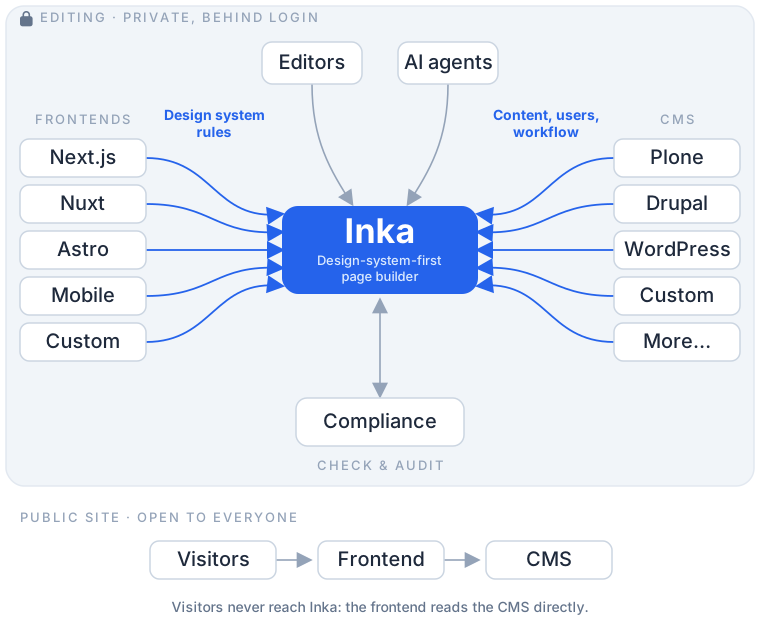
Pages are laid out in blocks, and the blocks are your design system. Each one is a component your developers already wrote. Alongside it go the rules for using it: what can go inside what, which fields an editor can change, what those fields will accept, and which combinations are not allowed at all.

So editors get a page builder that only offers what your design system allows. There is no freeform mode to fall out of, and an off-system page is not something anyone has to catch in review.

Any CMS, or several at once

An adapter plugin connects Inka to your content store, so editors get the same experience whatever sits behind it. Plone today, Drupal and WordPress next.

Different parts of the site can come from different places. News from one system, a product catalogue from another, policies from a third. Editors work on all of it in one place, and all of it is audited together.

If your content lives somewhere that is not a CMS, write an adapter for it. It uses the same contract the built-in ones do.

Any frontend, or several at once

Nuxt, Next.js, Astro, Vue and Framework7 work today. So do server-rendered sites in PHP, Django, Rails or Laravel.

You add one small JavaScript file and a few HTML attributes. There is no SDK to adopt, no framework to switch to and no heavy dependency to carry.

Run more than one channel from the same content, and switch between them while you edit to see the page through a different design system.

Everything a site has to get right

Compliance

Accessibility and the standards you are held to, checked as the page is written instead of turning up in an audit months later.

Design system

How the site is built. Components say what they allow, so editors cannot put together anything off-system.

Content governance

What the site says. Tone of voice, the words your brand uses and the ones it does not, and whether a claim is accurate.

AI governance

Agents connect over MCP and are held to the same rules as people, with the same record of what they changed. Nothing writes its way around them.

Editor experience

Drag, drop and edit on the real page, on a phone as well as a desktop. Enough control over layout to make something worth reading, and not so much that it stops being your design system.


People can break your design system

Usually by accident, and usually on a deadline. A machine can check colour contrast and heading order. It cannot tell you whether alt text says anything useful, whether the reading level suits your audience, or whether a photo belongs on that page.

So the rules a machine can settle are checked as people write. The rest go to someone who can judge them, and the answer is saved against that version of the page: who signed it off, when, and on what basis. Change the page and it comes back for review.

Overrides are saved the same way. They are one line in the record, not the point of it.

You end up with proof, not a pile of warnings. A record of what was checked and who approved it, ready for a compliance team or a tender.

AI can break your design system

Faster than people can, and at a scale no one is reviewing line by line.

Bring your own agent. It connects over MCP and gets the access an editor gets, follows the rules an editor follows, and leaves the same record of what it changed. There is no separate path for agents, because a separate path is how the rules get skipped.

And a design system is more than components and colour. It is how the site sounds, how hard it is to read, whether anyone can use it, and whether what you publish is true. Those are rules too, and they apply to an agent the same way they apply to a person.

It works in the other direction too. An agent that comes in through the same door as an editor can be asked to check as well as write: cross-checking a claim against your own documents, or catching a figure that does not match its source. Which checks run, and which of them need a person to sign off, is yours to set.

Open source, and yours to run

Install it on your own infrastructure. Nothing phones home, no content leaves your network, and nobody else decides when you upgrade.

Adding it to a frontend is one small JavaScript file and a few HTML attributes. Connecting it to a content store is an adapter plugin. It works out of the box and you can extend it when you need to.

The editor, the adapter API and the conformance suite are open source. You pay for the things a compliance team asks for: reporting and evidence, the record of overrides, roles and approvals, shared rules across sites, and single sign-on.


Try it

This site is editable. Log in as admin / admin and edit any page you can see. It resets overnight, so nothing you do sticks.

See it in other frontends

Find out more